ProximityLock is a security application for macOS that automatically locks your computer when your Bluetooth device moves out of range. Think of it as a digital leash for your computer's security. When you walk away with your phone or watch, your computer locks itself.
We've all done it. Stepped away from our desk for "just a minute" and forgotten to lock our computer. Whether it's a trip to the coffee machine, a quick meeting, or just walking away, an unlocked computer is a security risk. ProximityLock eliminates the need to remember keyboard shortcuts or worry about who might wander by.
Your computer locks automatically when your selected Bluetooth device moves out of range. No need to remember ⌃⌘Q or worry about leaving your computer unattended.
See your device's signal strength in real-time with a beautiful, interactive graph. Watch the signal change as you move around and find the perfect threshold settings for your environment.
Fine-tune your security with adjustable disconnect timeout (2-30 seconds) and signal strength threshold (-90 to -40 dBm). Adapt ProximityLock to your workspace, whether it's a quiet home office or a busy corporate environment.
Fully localized in over 20 languages including English, Spanish, French, German, Italian, Portuguese, Dutch, Japanese, Korean, Chinese (Simplified and Traditional), and many more.
Works with any Bluetooth device: iPhone, Apple Watch, AirPods, fitness trackers, or any other Bluetooth Low Energy (BLE) device. No special hardware or accessories required.
Get alerts when your computer locks or if something goes wrong. You'll always know your computer is protected, and you'll be notified immediately if permissions need attention.
Historical signal analysis prevents false alarms from brief signal drops. ProximityLock is smart enough to ignore temporary interference while still responding quickly when you actually leave.
All signal analysis happens locally on your computer. No data collection, no cloud services, no internet connections. Your security is protected, and so is your privacy.
Passive Bluetooth listening is extremely power-efficient, especially with BLE devices. ProximityLock automatically pauses during sleep to minimize battery impact on laptops.
Built using only public macOS APIs and running in the App Sandbox for maximum security. Approved for App Store distribution.
Beautiful, modern interface that follows macOS design guidelines. Supports both light and dark mode, and looks at home on any computer.
Configure once, then let ProximityLock work silently in the background. Add it to Login Items and you'll be automatically protected every time you log in.
ProximityLock continuously monitors your selected Bluetooth device's signal strength. When the signal weakens below your configured threshold and stays weak for your configured timeout period, ProximityLock immediately locks your screen.
This happens automatically. No buttons to press, no timers to set. Just walk away with your device, and your computer is secured.
Unlike other solutions, ProximityLock doesn't need to pair or connect to your device. It simply listens to Bluetooth advertisements, making it compatible with more devices and more reliable in busy Bluetooth environments. We designed it this way because pairing is unreliable and frankly, unnecessary when your device is already broadcasting its presence.
The real-time signal graph isn't just pretty. It's a powerful diagnostic tool. You can see exactly what ProximityLock sees, understand why locks occur, and tune your settings with confidence.
ProximityLock uses historical signal analysis to prevent false alarms. Brief signal drops from interference don't trigger locks, but sustained weak signals do. It's the perfect balance of security and usability.
No analytics, no telemetry, no cloud services. We built ProximityLock to do one thing: protect your computer, and nothing else. Your data stays on your computer.
ProximityLock uses the screen saver mechanism to lock your computer, and there's a good reason for this approach.
Here's the thing: macOS doesn't provide an officially approved API for directly locking the computer. While there are undocumented methods that some apps use, we built ProximityLock to be secure and trustworthy, which means using only Apple-approved, documented APIs.
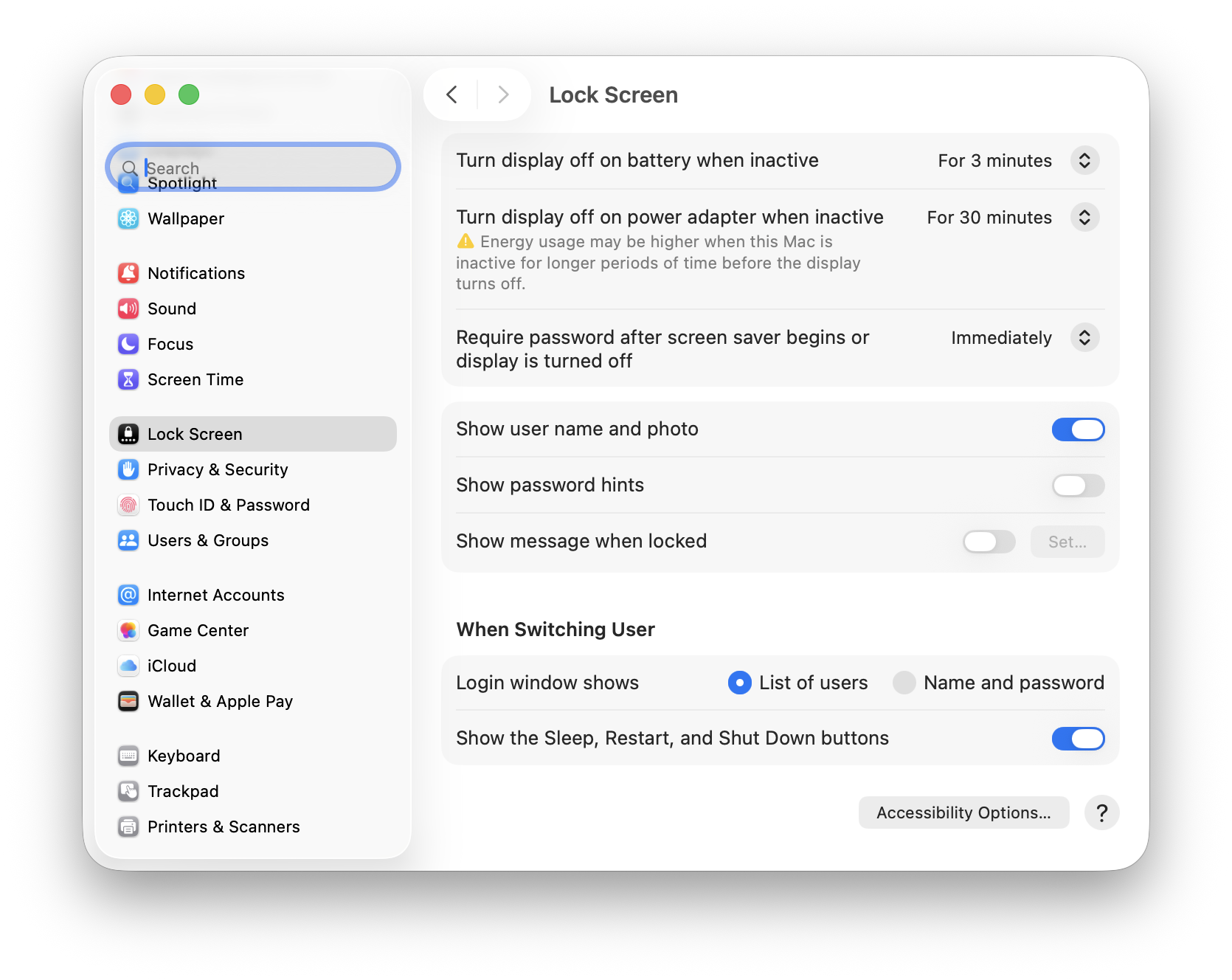
This approach has a significant advantage: you control the security level. macOS lets you configure how quickly a password is required after the screen saver starts:
Critical Security Requirement: For ProximityLock to actually secure your computer, you must enable password protection in System Settings:
System Settings → Lock Screen → "Require password [immediately] after sleep or screen saver begins"
We strongly recommend setting this to "immediately" for maximum security. Without this setting enabled, ProximityLock will start your screen saver, but anyone can wake it without a password, defeating the purpose of automatic locking.
This design philosophy (security through officially supported methods) ensures ProximityLock will continue working reliably as macOS evolves. We'd rather use stable, documented APIs than clever hacks that might break with the next OS update.
Ready to protect your computer? See the Quick Start guide to get up and running in just a few minutes.
Want to understand the technology behind it? Check out How It Works for a deep dive into proximity monitoring.
Absolutely. Apple could enhance macOS by offering a native proximity-locking feature that's built seamlessly into the OS with less overhead, direct screen locking without needing the screen saver workaround, and access to system-level capabilities that third-party apps just don't have.
At the OS level, these radio signals are already there. macOS could track them continuously, let you select your device, and use days of historical signal data to automatically adjust sensitivity. The storage requirements are minimal, and since the OS is always running, it would have far more data to work with than ProximityLock ever could. The result would be smarter, more reliable proximity detection with near zero configuration. Plus, being at the OS level means it could be isolated. No need to trust a 3rd-party app that's listening to your Bluetooth signals.
I actually hope Apple does build something like this. Getting Sherlocked wouldn't be so bad. At least then everyone would have this feature built in. I'd hope they'd give me some credit (or maybe a MacBook Pro M6+ Max?), but honestly, I'd just be happy knowing the idea caught on and maybe even bring me into the discussion (being in the loop, so to speak).
Until then, ProximityLock is my simple and clean way to provide this feature within the constraints of an app today.
© 2025-2026 - Michael Sinz